
⚠️ Important 🌧️ Deliveries may be affected due to rains in Central & Northern regions of Pakistan. Rest assured, the weather may slow us down but it will not stop us.

Welcome

TCS Express

TCS Tracking

How to Track TCS Parcel in 2 Minutes: 4 Easy Steps 2026

How to Track TCS Parcel Online (4 Simple Steps)

Tracking your TCS parcel online is the fastest and most convenient method to check real-time delivery status from booking through final delivery, requiring only your CN (consignment number) and internet access via computer, smartphone, or tablet to view complete shipment updates in under 10 seconds. This step-by-step tutorial walks you through the exact process used by millions of TCS customers across Pakistan to monitor parcels using the official TCS tracking portal, with visual guidance at every stage to eliminate confusion and ensure successful tracking on your first attempt.

📦 Complete TCS Online Tracking Process
Follow these 4 simple steps to track your parcel in under 10 seconds
1
STEP
Locate your 10-12 digit TCS tracking number (also called CN number or consignment number) printed on your booking receipt. This unique code appears near the top of the slip, usually labeled "CN" or "Tracking No." in bold text.
📋 Where to Find It:
Check your booking receipt, SMS from shortcode 8225, or email confirmation from TCS/online store
💡
Don't know what your tracking number looks like? Read the TCS tracking number format guide to understand the CN-XXXX structure before continuing.
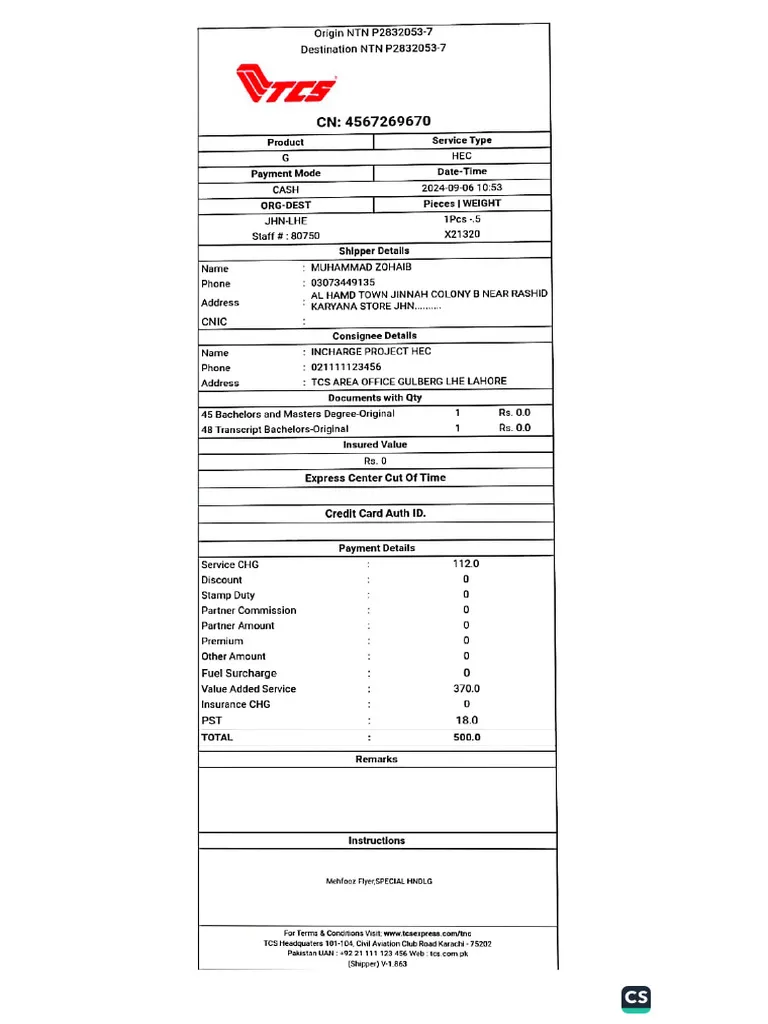
TCS booking receipt showing CN number at the top
TCS booking receipt with CN: 4567269670 clearly visible at the top
2
STEP
Visit TCS Tracking Page
Open your web browser (Chrome, Safari, Firefox) and navigate to the official TCS tracking portal. You can use any device—computer, smartphone, or tablet—with an active internet connection to access the tracking system.
🌐 Direct Link:
Go to tcsexpress.com.pk/tcs-tracking-pakistan/ or search "TCS tracking Pakistan" on Google
💡
Bookmark the tracking page for faster access next time, or download the TCS mobile app for one-tap tracking on your phone.
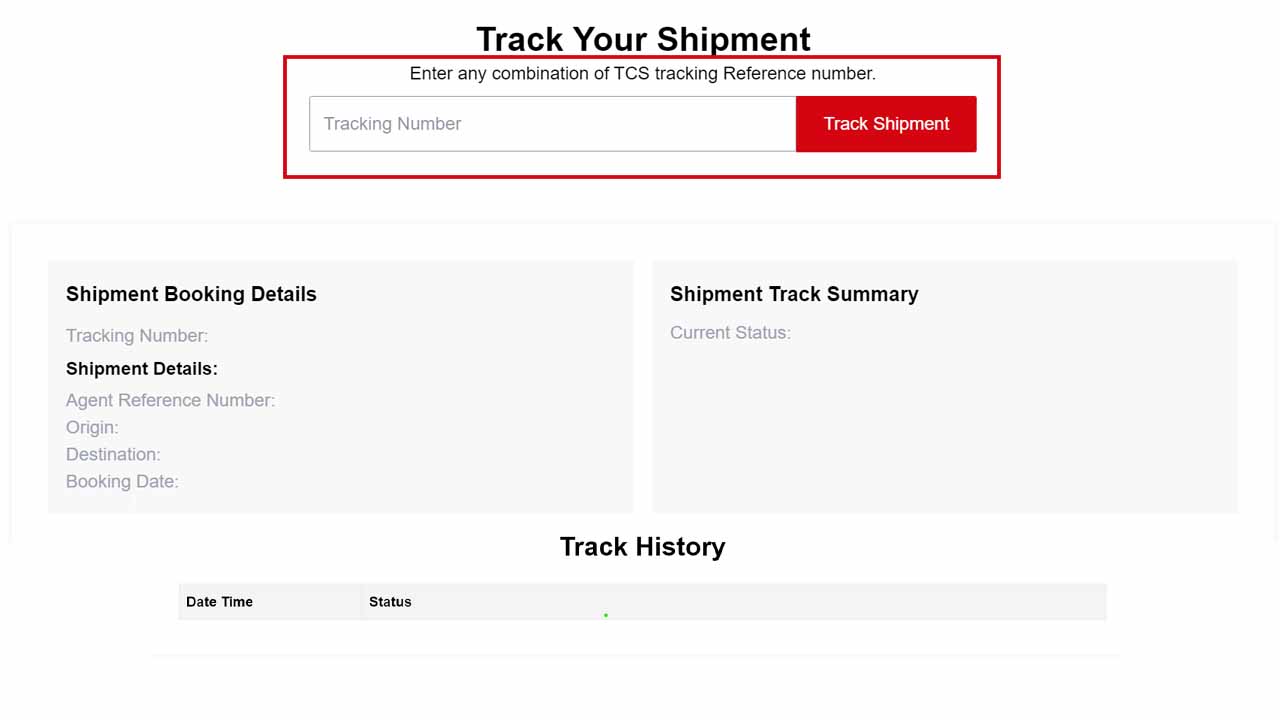
TCS official tracking portal interface
Official TCS tracking portal showing the tracking input box
3
STEP
Enter Your Tracking Number
Click inside the tracking input box and carefully type or paste your 10-12 digit CN number with no spaces, dashes, or extra characters. Double-check that every digit matches your receipt before clicking the Track button.
⌨️ Entry Tips:
✓ Copy-paste from SMS/email to avoid typos
✓ Enter as continuous string: 9876543210
✓ CN prefix optional: CN9876543210 also works
💡
Common mistake: Adding spaces like "9876 543 210" will cause "no record found" errors. Always enter as one continuous number.
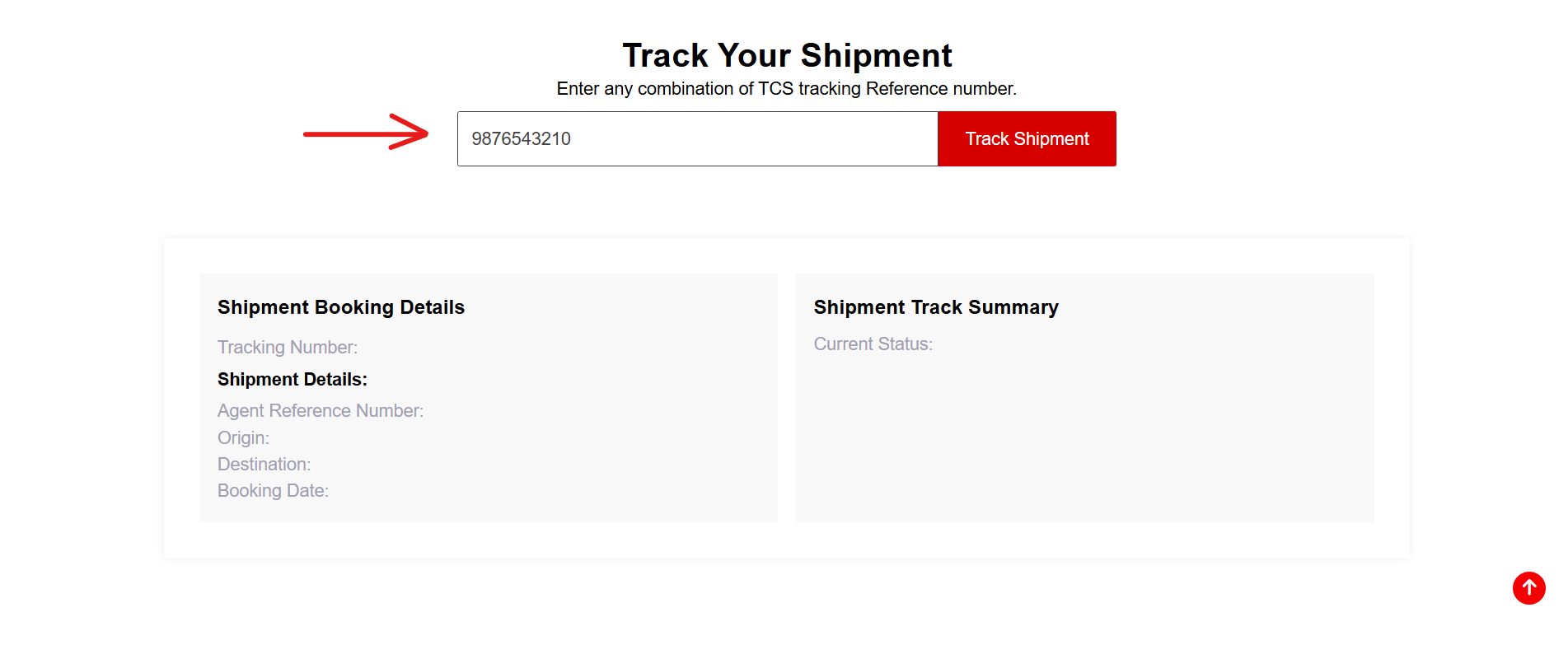
Entering CN tracking number in the input field
Example: Entering tracking number 9876543210 in the search field
4
STEP
View Tracking Results
Within 2-5 seconds, the tracking system displays your parcel's current status, last scanned location, movement history timeline, and estimated delivery date. Look for statuses like Booked, In Transit, Out for Delivery, or Delivered with exact dates and city names.
📊 What You'll See:
Current status • Scan history • Destination city • Delivery ETA • Courier contact (if out for delivery)
💡
Refresh the page every 3-4 hours for latest updates. The system updates whenever your parcel is scanned at checkpoints across Pakistan.
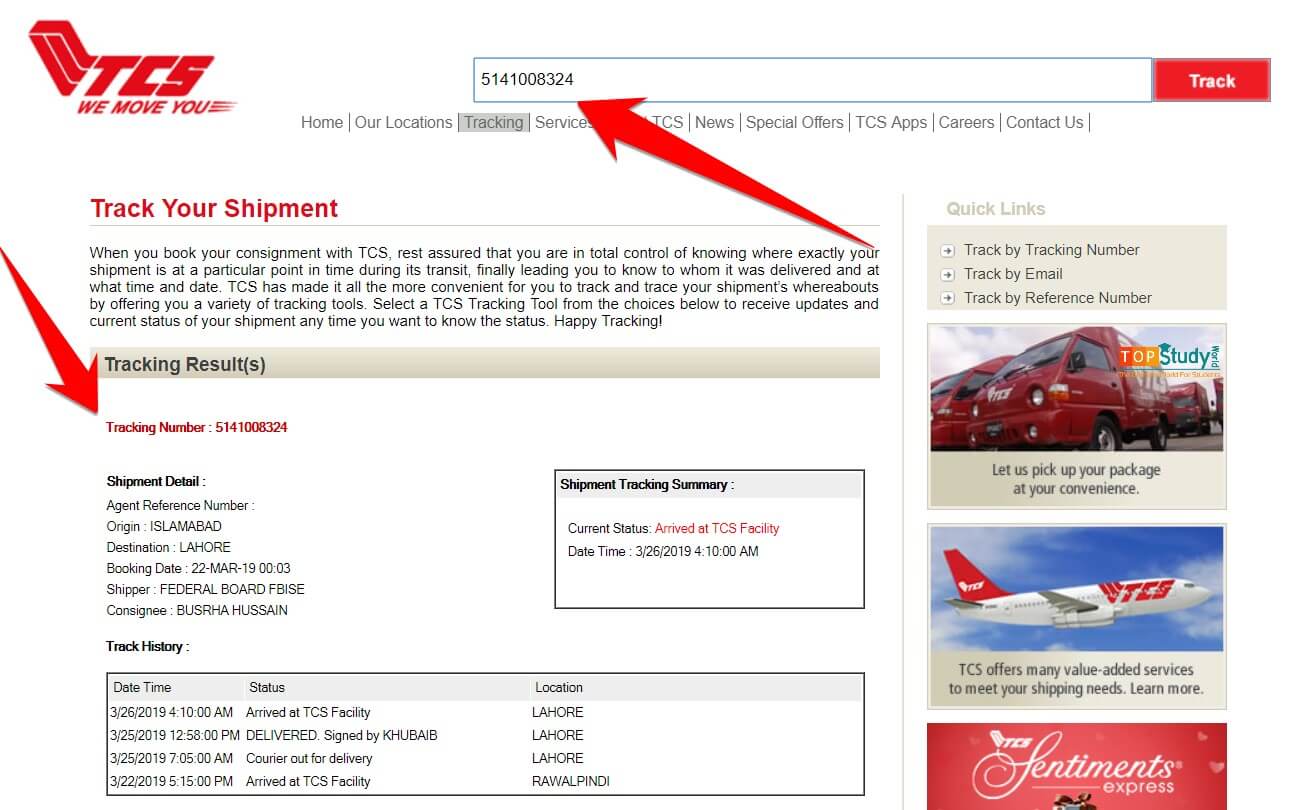
Sample TCS tracking results showing shipment details
Tracking results page displaying shipment booking details and track summary
That's It! You're Now Tracking
This is the fastest tracking method used by millions of TCS customers daily. If your tracking number shows "no record found," wait 4-6 hours after booking for the system to register your parcel, or check the troubleshooting section below for common solutions.

Why online tracking is the best method: 

The official TCS website updates automatically every 2-4 hours as your parcel moves through sorting facilities, transit hubs, and delivery routes, providing more accurate and detailed information than SMS or helpline tracking which only show basic status snapshots. Website tracking also lets you view complete scan history with timestamps, save screenshots for proof of delivery, and track multiple parcels simultaneously if you’re managing business shipments—features unavailable through other tracking methods.

Understanding your tracking number: 

If you’re unsure about the format of your TCS tracking number or can’t find it on your receipt, read our detailed TCS tracking number format guide that explains the CN-XXXX structure, where to locate your number, and common formatting mistakes that cause tracking errors.

Track TCS Parcel via Mobile App

The TCS mobile app provides the most convenient tracking experience for smartphone users, letting you monitor shipments on-the-go with push notifications, save multiple tracking numbers, and access additional features like rate calculation and pickup booking all in one place. Download the official TCS Pakistan app from Google Play Store (Android) or Apple App Store (iOS) to start tracking parcels directly from your phone without opening a browser.

How to Track Using TCS Mobile App:

  • Step 1: Download the app
    Search for “TCS Pakistan” or “TCS Express” in your phone’s app store and install the official TCS app (look for the red TCS logo to confirm it’s authentic, not a third-party tracker).
  • Step 2: Open and navigate
    Launch the app—no account creation required for basic tracking—and tap the “Track Shipment” or “Tracking” button visible on the home screen.
  • Step 3: Enter tracking number
    Type or paste your 10-12 digit CN number into the tracking field, ensuring no spaces or extra characters, then tap “Track” to load results.
  • Step 4: View real-time updates
    The app displays your parcel’s current status, scan history, and estimated delivery date with cleaner formatting than the mobile website, plus you can enable push notifications to get alerts when status changes (In Transit → Out for Delivery → Delivered).
  • Step 5: Save for quick access
    Bookmark frequently tracked parcels using the app’s “My Shipments” feature to avoid re-entering CN numbers every time you check status.

App-Exclusive Benefits:

  • Push notifications: Automatic alerts when your parcel reaches key checkpoints (picked up, arrived at destination, out for delivery)

  • Track multiple parcels: Monitor 5-10 shipments simultaneously with saved tracking numbers

  • Offline access: View previously loaded tracking history even without internet connection

  • One-tap tracking: Faster than opening browser and typing URL every time

Find the TCS tracking number format guide helpful if you’re unsure about your CN number structure, or use the app’s built-in rate calculator to estimate shipping costs before booking your next parcel.

Track TCS Parcel via SMS

Step 1: Open your messaging app

On your mobile phone, open the default SMS app and start a new message to the official TCS SMS tracking number listed on their website or tracking tools (for many customers this is the same short code that sends booking updates, such as 8225 or the long code used by some tracking portals).

Step 2: Type your CN number

In the message body, type your full TCS tracking / CN number exactly as shown on your receipt or SMS, without spaces or extra characters.

Step 3: Send the SMS

Send the message to the official TCS SMS tracking code; standard SMS charges from your mobile network may apply depending on your package.

Step 4: Read the reply

Within a short time, you receive an automated reply SMS showing your parcel’s current status, last scanned location, and sometimes an estimated delivery date, which is especially helpful for customers in rural areas or weak-signal locations where mobile data is unreliable.

Track TCS Parcel by Mobile Number

TCS allows you to track parcels using your registered mobile number if you’ve lost your CN slip or the sender didn’t provide the tracking number. This method works by retrieving all shipments linked to the phone number (sender’s or receiver’s) that was provided during booking, making it especially useful for COD orders where customers receive parcels without knowing the CN number upfront.

How Mobile Number Tracking Works:

Via TCS website or app
Visit the official TCS tracking portal or open the mobile app, select the “Track by Mobile Number” option (if available), and enter your 11-digit Pakistani mobile number in 03XX-XXXXXXX format. The system displays all parcels linked to that number from the past 90 days, showing consignment numbers, current status, and delivery estimates in one view.

Via TCS helpline
Call the TCS helpline at 111-123-456 and provide your registered mobile number to the customer service agent, who can manually look up shipments associated with your phone number and share tracking details including CN number and current status.

Security verification
For privacy protection, TCS may send an OTP (one-time password) to your registered mobile number before revealing tracking information, ensuring only authorized recipients can access shipment details through this method.

Important Limitations:

  • Only works if your mobile number was registered during booking (either as sender or receiver)

  • Not all TCS tracking portals support direct mobile number lookup online—helpline remains the most reliable method

  • Business customers sending bulk parcels may find this method less practical than CN-based tracking

For lost tracking numbers, read our guide on tracking TCS parcels without a CN number for additional recovery methods including CNIC lookup and branch visits.

Track TCS Parcel via Helpline

Calling the TCS helpline provides personalized assistance when you need human support for tracking issues, delivery instructions, or clarifications about your shipment status. This method works best for customers who prefer speaking directly with customer service agents or face technical difficulties with online tracking systems.

How to Track via TCS Helpline:

Step 1: Call the helpline
Dial 111-123-456 (TCS’s national customer service number) from any landline or mobile phone in Pakistan; the call is toll-free from landlines and charged at standard rates from mobile networks.

Step 2: Choose tracking option
Listen to the automated menu and press the appropriate number for “Tracking” or “Shipment Status” (usually option 1 or 2), or wait to speak directly with a customer service representative.

Step 3: Provide your details
Share your CN tracking number, registered mobile number, or receiver’s name and address with the agent—having your booking receipt ready speeds up the process.

Step 4: Note the information
The agent provides your parcel’s current status, last scanned location, estimated delivery date, and delivery rider’s contact number if the parcel is out for delivery; write down all details for future reference.

When to Use Helpline Tracking:

  • Website or app showing errors or “no record found”

  • Need to update delivery address or provide special instructions

  • Parcel stuck in transit for more than expected delivery time

  • Want to file a complaint about delayed or missing shipment

For common tracking errors and solutions, check the TCS tracking troubleshooting guide or learn about filing complaints for unresolved delivery issues.

How to Track Multiple TCS Parcels at Once

Business owners, online sellers, and frequent shippers managing several shipments simultaneously can track up to 10 TCS parcels at once using bulk tracking features available through the TCS website, mobile app, and third-party tracking dashboards. This saves time compared to entering each CN number individually and provides a consolidated view of all shipment statuses in one place.

Bulk Tracking Methods:

  • TCS website batch input: Visit the TCS tracking Pakistan portal and enter multiple CN numbers separated by commas or line breaks in the tracking field, then click “Track All” to display all parcels with their current statuses (Booked, In Transit, Out for Delivery, Delivered) in a single results page.
  • TCS mobile app saved shipments: Download the official TCS Express app and use the “My Shipments” feature to save frequently tracked CN numbers—the app automatically refreshes status for all saved parcels and sends push notifications when any shipment status changes.
  • TCS customer dashboard (for businesses): E-commerce sellers and corporate clients can request access to TCS’s business tracking dashboard through their nearest TCS office or by calling the TCS helpline, which allows monitoring hundreds of parcels with advanced filters by date, destination, or status.
  • Third-party tracking APIs: Businesses integrating tracking into their websites or order management systems can use TCS tracking APIs or third-party aggregators that pull status updates automatically and display them in custom dashboards—ideal for high-volume sellers managing 50+ daily shipments.

For detailed shipping cost calculations before booking multiple parcels, use the TCS rate calculator to estimate charges by weight and destination, or visit the TCS courier charges guide for city-wise pricing tables.

Understanding TCS Tracking Status Messages

Every time your parcel moves through TCS’s logistics network, the system updates its status with specific messages that tell you exactly where it is and what’s happening next. Understanding these status codes helps you predict delivery timelines, identify delays requiring action, and know when to be available for final delivery—no more guessing or unnecessary calls to customer service.

Common TCS tracking statuses range from initial “Booked” confirmation through various transit stages to final “Delivered” completion, with each status representing a specific checkpoint in Pakistan’s courier infrastructure spanning sorting hubs, inter-city transport, and last-mile delivery operations. Below is a complete breakdown of every status you might encounter while monitoring your shipment, plus recommended actions for each stage.

What each status means and what you should do
Status What It Means What You Should Do
Booked Initial
TCS has accepted your parcel at a branch and created a CN number. The shipment is registered in the system and waiting to move to the first sorting hub. Save your tracking number. No action needed—parcel will move to "Picked Up" status within 4-8 hours.
Picked Up In Progress
The parcel has been collected from the booking branch and is on its way to the city's main sorting facility for processing and onward dispatch. Normal progress. Check back in 12-24 hours for the next update showing "In Transit" status.
In Transit Moving
Your parcel is actively traveling between TCS hubs or cities via road/air transport. You may see multiple "In Transit" scans as it moves closer to the destination. Normal for 1-3 days depending on distance. If stuck longer than 4 days, call TCS helpline with your CN.
Arrived at Facility Near You
The parcel has reached the local TCS facility in your destination city. It's being sorted and prepared for loading onto a delivery rider's route. Delivery usually happens within 24 hours. Ensure someone is available at the delivery address tomorrow.
Out for Delivery Today
Your parcel is with the TCS delivery rider and will be delivered today. The rider has your contact number and may call before arrival. Stay available at the delivery address. Keep your phone on in case the rider calls for directions or gate code.
Delivered Complete
Your parcel has been successfully delivered and received at the destination address. The system shows delivery date, time, and sometimes the receiver's name. Tracking complete! If you didn't receive it, contact TCS helpline immediately with your CN number for investigation.
Attempted Delivery Action Needed
The rider visited your address but couldn't complete delivery (nobody home, wrong address, phone unreachable). The parcel will be re-attempted tomorrow or held at the local office. Urgent: Call TCS helpline to schedule re-delivery or arrange office pickup before it's returned to sender after 3 failed attempts.
On Hold Delayed
Delivery is temporarily paused due to address issues, payment problems (COD), recipient unavailability, or operational delays like weather/strikes. Action required: Contact TCS to resolve the issue—update address, confirm COD amount, or provide alternate delivery instructions.
Returned to Sender Failed
The parcel could not be delivered after multiple attempts (wrong address, refused by recipient, payment issues) and is being sent back to the original sender's address. Failed delivery. If you're the sender, expect return within 3-7 days. Receivers should contact the sender to reship with corrected details.
Customs Clearance International
(International only) Your parcel is undergoing customs inspection and documentation review. This adds 3-7 days to delivery timelines and may require duty payment. Normal for international shipments. TCS will contact you if duties/taxes are required before clearance. Monitor email/SMS for updates.

Pro tip: Status updates refresh every 2-4 hours as parcels move through checkpoints, so frequent checking won’t show changes faster—check once in the morning and once in the evening for the most efficient tracking routine. If your status hasn’t changed for 48+ hours or shows unusual delays, use the TCS complaint process to escalate the issue or visit your nearest TCS office with your CN number for in-person assistance.

TCS Tracking Not Working? Troubleshooting Guide

Even with TCS’s reliable tracking system, users occasionally encounter issues ranging from “no record found” errors to stuck delivery statuses. Most problems stem from simple data entry mistakes, newly booked parcels waiting for initial scans, or temporary network delays during peak seasons. Here are the four most common issues and their instant fixes.

🔍 Problem 1: CN Number Shows “No Record Found”

Why it happens:

  • Typos or extra spaces in the tracking number

  • Missing digits when copying from booking slip

  • Parcel too new—not yet in system (needs 2-4 hours)

Quick fix:
Compare your CN character-by-character against the original SMS or booking receipt. Wait at least 12-24 hours after booking before checking again. Still showing errors after 24 hours? Call the TCS helpline at 111-123-456 with your booking date for manual lookup.

⏸️ Problem 2: Status Stuck for Days Without Updates

Why it happens:

  • Inter-city transport delays during high traffic

  • Customs clearance for international shipments

  • Sorting hub congestion during Eid or Black Friday

Quick fix:
Check twice daily (morning/evening) instead of hourly—updates refresh every 2-4 hours, not real-time. Stuck beyond 4-5 days? Use the TCS complaint portal to escalate or visit your nearest branch with your CN.

🌐 Problem 3: Website or App Not Loading

Why it happens:

  • System maintenance or server downtime

  • High traffic spikes during peak hours

  • Browser cache storing old page data

Quick fix:
Try SMS tracking—send your CN to 53535 for instant status updates. Clear browser cache/cookies or switch browsers. Use the TCS mobile app as backup, or check third-party tracking sites like 17track.

❌ Problem 4: Shows “Delivered” But You Didn’t Get It

Why it happens:

  • Received by family member/neighbor/security guard

  • Delivered to wrong address or unit number

  • System error or fraudulent delivery claim

Quick fix:
Check with household members, neighbors, and building security immediately. Call TCS helpline within 24 hours to file urgent investigation—they have delivery proof photos and signatures. Provide your CN, address, and expected receiver name for immediate escalation.

TCS Customer Service & Support Channels

Getting help with TCS shipments is straightforward through multiple contact channels designed for different urgency levels and query types. Whether you need instant tracking updates via SMS, detailed complaint resolution through email, or real-time assistance from call center agents, TCS maintains 24/7 nationwide support infrastructure with dedicated helplines for major cities. Choose your preferred contact method below based on your specific situation.

📞 Phone Support (Fastest for Urgent Issues)

Universal Helpline: 021-111-123-456
Works nationwide from any mobile network—connect within 2-3 minutes during business hours (Mon-Sat, 9 AM-6 PM). Available 24/7 with faster response during office hours. Use for tracking queries, delivery rescheduling, address changes, rate inquiries, and urgent complaint registration.

City-Specific Numbers:

  • Karachi: 021-111-123-456

  • Lahore: 042-111-123-456

  • Islamabad: 051-111-123-456

💬 WhatsApp Support (Quick & Convenient)

WhatsApp Number: +92-21-111-123-456
Send your CN number directly for instant status updates without calling. Ideal for tracking inquiries, booking confirmations, and simple questions. Available 24/7 with faster responses during business hours. Often quicker than phone during peak call times.

📧 Email Support (Best for Written Records)

Email Address: customercare@tcs.com.pk
Send detailed complaints with attachments (photos of damage, booking receipts, tracking screenshots). Include your CN number, full name, phone, and issue description for faster resolution. Typical response time: 24-48 hours during business days. Best for formal complaints requiring documentation.

📱 SMS Tracking (Instant Status Updates)

SMS Number: 53535
Send your CN tracking number to 53535 for immediate parcel status via text message. No internet required—works on all networks. Free service for quick checks without opening apps or websites. Ideal when website is down or you’re in low-signal areas.

🏢 Walk-In Branch Support (Face-to-Face Help)

Visit your nearest TCS office for in-person assistance with complex issues like lost parcels, damaged goods claims, or rate disputes. Standard hours: Mon-Sat, 9 AM-6 PM (some major city branches open until 9 PM). Bring your CN number, booking receipt, and ID for faster service.

🌐 Online Complaint Portal (Formal Escalation)

Use the TCS complaint portal for formal complaint registration with tracking reference numbers. Submit via phone (fastest), email (creates paper trail), or branch visit (for escalation). Average resolution time: 24 hours for simple queries, 7 days for complex claims. Track complaint status using your reference number.

frequently asked questions

You can calculate TCS shipment rates using the official TCS rate calculator by entering your parcel weight, origin, and destination cities for instant pricing.
TCS international rates vary by destination country and weight. Check the complete TCS international rates per kg for accurate pricing to countries like UAE, USA, UK, and Saudi Arabia.
Yes, TCS charges additional fees for same-day delivery services within major cities. Contact the TCS helpline number at **021-111-123-456** for same-day delivery rates.
Yes, TCS applies additional COD charges based on the collected amount. Visit the nearest TCS office location or check their rate card for COD fee details.
You can track your parcel using the TCS tracking system by entering your consignment number (CN) found on your TCS receipt.

Conclusion

Understanding TCS shipment rates is essential for cost-effective courier services across Pakistan. Whether you’re sending documents locally or parcels internationally, using the TCS rate calculator ensures accurate pricing before booking.

TCS offers transparent pricing with competitive rates for domestic and international deliveries. From same-day express services to economical cargo options, TCS caters to all shipping needs. For the latest rate updates, visit the official TCS shipment rates page or contact their 24/7 helpline at 021-111-123-456.

Tracking your shipment is simple with the TCS tracking system. Enter your consignment number (CN) to monitor delivery status in real-time. For branch-specific queries, locate your nearest TCS office through their online directory.

Whether you’re a business shipping bulk orders or an individual sending a parcel, TCS remains Pakistan’s most reliable courier service with nationwide coverage and international reach. Plan your shipments wisely by comparing rates and choosing the service that fits your budget and timeline.

Leave a Comment